 A client recently asked me how to set up and send HTML emails from Outlook with a pre-formatted template. He wanted to use it to send out email newsletters.
This is quite simple to do from Outlook. I use Outlook 2003 but the principle is the same whatever version you’re using.
A word of caution though before you start using it to bulk email to your client list. If you’re sending to a large distribution list I advise against using Outlook through you ISP’s server. ISPs tend to get upset about sending a large volume of email through their servers. Also, if people complain about spam, you could be in big trouble with your ISP and lose your email account.
It’s better to use one of the online services to send bulk html email. I use a service called Campaign Monitor to send bulk html emails. It costs a few pounds but well worth it in the end.
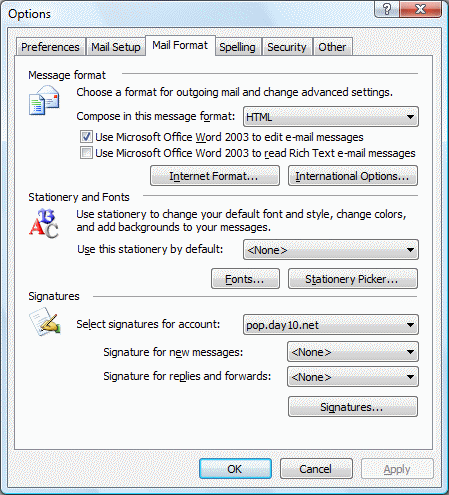
Firstly set Outlook to use Word as the editor of choice and set the message format to be HTML. To do this:
Click on Tools in the main menu bar and from the drop-down click options. Then select the Mail Format tab in the Options box.
Then compose your template. You can do this using Word. Use tables to format and layout the template as you want it.You can paste images in the document.
When you’ve set up the template and added your content you’re ready to create the email.
Start a new email message. If you want the background coloured set this first using the Background option under Format in the top menu bar of the message window.
Then paste the template you created into the new message, set the addressees and title and then send.
That’s it. Have fun.